UVIMate - UV Index Now
- 3.6
- Rating
- 100.00K
- Installs
- Free
- Price

 Analysis by App-foxy
Most weather apps tell me whether I should expect rain, clouds, or heat. UVIMate takes a narrower and more useful approach: it helps me judge how much ultraviolet exposure the day may bring and when I should be more careful outdoors. That focus makes it different from a normal forecast app, especially when the real question is not “Will it rain?” but “Is it sensible to stay in the sun right now?”
I reviewed it as a free weather app from Full Stack Cafe Pty Ltd, and I found its strongest value in turning an easy-to-ignore health concern into something I can check alongside the forecast. It is available for Everyone, supports Android versions from 4.4 onward, and has reached over one hundred thousand installs. Its average rating sits at 3.6 from around two thousand ratings, which feels consistent with an app that has a clear purpose but may not satisfy people looking for a complete replacement for a large weather service.
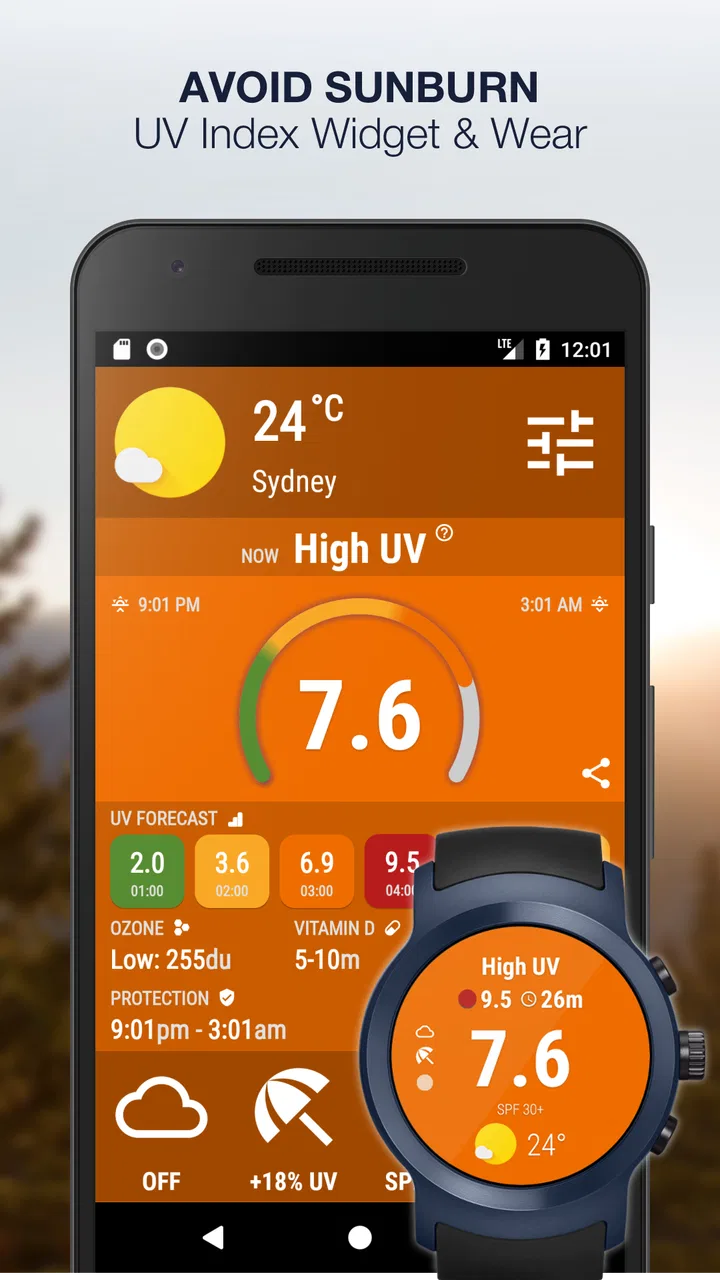
The central capability is a global, real-time UV index forecast, supported by sun-safety guidance and a widget. In my experience, that combination matters because the UV index is often buried inside broader weather screens. Here, it is the reason to open the app, not a small line beneath temperature and wind. If you spend time walking, running, gardening, commuting, or taking children outside, that difference can make the information easier to notice before you leave.
You May Also Like

 Blood Strike: 2.5 Anniversary
Blood Strike’s Loadouts Turn Every Drop Into a Tactical Gamble
A close look at Blood Strike’s custom loadouts: how fast access to signature weapons reshapes its battle royale rhythm, rewards preparation, and narrows the gap between fights.

 Pandora - Music & Podcasts
Pandora’s Music Is Easy to Start, but Harder to Recover
Pandora’s strength is its low-effort path from a seed to a station. Its weak spot is how much confidence it asks you to place in connection, setup, and quiet recovery.

 8 Ball Pool
 Is Built on Rivalries, Rematches, and Routine
A close look at the rivalries, rematches, shared routines, and unanswered safety questions that turn a quick pool match into a persistent mobile community.

 Samsung Music
’s Quiet Strength Is Playing What You Already Own
Its reach comes less from spectacle than from dependable access to a personal library. That simplicity is both the app’s strongest retention engine and its ceiling.

 AccuWeather: Weather Radar
AccuWeather Review: A Quick, Clear Forecast for Everyday Decisions
For everyday plans, the best forecast is the one you can understand quickly. AccuWeather makes rain timing, radar, and local conditions easy to act on, with a few trade-offs.

 Hill Climb Racing
Why Hill Climb Racing Still Turns Crashes Into One More Run
A tiny car, a bumpy hill and one more upgrade: Hill Climb Racing keeps resurfacing because its simple chaos makes every near-miss feel personal.
More From Our News Desk



Why the UV forecast is more useful than another temperature screen
Temperature is intuitive, but it is a poor shortcut for sun exposure. A mild day can still call for caution, while a hot day may not tell me exactly when the risk is highest. The app’s emphasis on ultraviolet conditions gives me a separate signal to consider before planning outdoor time. That is the capability I think deserves attention: it does not merely decorate a general forecast with a sun icon; it places UV conditions at the center of the decision.
I particularly like this approach for routine decisions. When I am deciding whether to walk during lunch, sit outside with a book, or move exercise to another part of the day, a UV-focused forecast can be more relevant than a detailed list of weather symbols. It encourages me to think about shade, clothing, sunscreen, and breaks instead of treating sunshine as automatically harmless.
The app is also useful for people who already know the basics of sun protection but do not consistently apply them. A visible forecast can act as a prompt. I would not treat it as medical advice, and I would not use a screen reading as permission to ignore sensible protection, but it can make an overlooked factor part of my daily planning.
Its widget is important in this respect. A widget can reduce the friction of opening an app and searching for the relevant information. If I place it where I normally glance at the weather, the UV index becomes part of the same quick routine. That is more practical than remembering to check a specialist tool only after I have already stepped outside.
How I use it before leaving home
My useful workflow is simple: I check the current UV conditions, look ahead at the forecast, and then match the timing of my plans to the level of exposure I am comfortable with. For a short errand, that may mean choosing a shaded route. For a longer outdoor activity, it may mean carrying a hat, planning breaks indoors, or avoiding the brightest part of the day.
The important detail is that I do not read the number in isolation. I treat it as one planning input, alongside cloud cover, temperature, wind, and the length of time I expect to be outside. This makes the app more valuable than a one-second glance that produces a number but no decision. Its sun-safety orientation helps connect the forecast with an action.
A realistic example is a weekend sports practice. A standard weather app might tell me that conditions are dry and comfortable. UVIMate can make me ask a different question: will the players be exposed for a long period, and should I organize shade, water, protective clothing, or a change in timing? The app does not solve that planning problem by itself, but it makes the missing question much harder to overlook.
For families, I see another practical use. Parents often check rain before a playground visit and temperature before dressing a child, but UV exposure can receive less attention because it is not immediately visible. A quick glance at the widget or forecast can become part of the same departure routine. I would still make the final decision based on the child’s age, skin, clothing, and time outside rather than relying on the app alone.
The widget changes the habit more than the forecast does
In my view, the widget is not just a convenience feature. It changes whether the information is actually used. A forecast that requires several taps is easy to forget, while a glanceable display can influence a decision before I leave. This is one of the less obvious strengths of a focused app: the narrower subject makes the home-screen placement feel purposeful rather than crowded with unrelated details.
There is also a trade-off. A widget is only helpful if it remains clear in the space available and if I remember to keep it where I can see it. People who already have a crowded home screen may not want another weather element. I would recommend it most to someone who repeatedly spends time outdoors, not to someone who checks weather once every few days and prefers a single all-in-one forecast.
The app’s global positioning also broadens its usefulness. It is not presented as a tool limited to one city or one climate, so travelers and people who move between locations can find the concept relevant in more than one place. That does not mean I would stop checking local conditions from other sources when planning a serious trip. It simply means the UV question remains useful wherever I am.
Where it fits beside ordinary weather apps
I would not replace a full weather app with this one if I need radar, detailed precipitation maps, hourly wind information, severe-weather warnings, or a wide range of environmental measurements. A general weather service is usually better for building a complete picture of the day. UVIMate earns its place beside those tools because it gives one concern more attention than a broad forecast normally can.
That distinction helps explain its rating of 3.6. Someone searching for an all-purpose weather dashboard may find the experience too specialized, while someone who wants a straightforward UV check may appreciate the directness. The app is not competing on the same terms as a feature-heavy weather platform. Its success depends on whether ultraviolet exposure is important enough in your routine to justify a dedicated view.
I also prefer using it as a decision aid rather than as a precision instrument for every outdoor plan. Forecasts can change, local shade can alter actual exposure, and personal sensitivity varies. The app is strongest when it prompts sensible preparation. It is weaker if a user expects a single reading to account for every factor affecting their skin or health.
A good daily scenario: fitting outdoor time around the sun
Imagine I have a flexible morning, a midday appointment, and an evening walk. Instead of choosing based only on temperature, I can compare the UV outlook with the timing of those plans. If the morning is more comfortable for an extended walk, I can use that window. If I must go out later, I can shorten the exposed portion of the trip and plan shade or protective clothing.
This is where the app’s capability has a real effect: it can change the schedule, not merely describe it. That may sound minor, but repeated small choices are exactly where a weather tool becomes useful. I do not need to stare at the forecast all day. I need enough information to decide when to go, what to bring, and whether a shaded alternative makes sense.
For outdoor workers, gardeners, cyclists, runners, and beach visitors, the value is even clearer because exposure is part of the activity rather than an accidental few minutes. I would use the forecast before starting, then reassess the situation through the day instead of assuming the morning check remains accurate forever. The app supports planning; it does not remove the need for judgment.
What may frustrate some users
The focused design can feel limited if I want a broad weather experience. A person who expects one app to cover every forecast detail may find the emphasis on UV too narrow. Even the sun-safety angle, while useful, will not appeal equally to someone who spends most days indoors or already has a trusted routine built around another weather service.
There are also optional purchases, priced from under one dollar to ten dollars per item. That does not change the fact that the app itself is free, but it is worth remembering if you prefer apps with no purchase prompts at all. I would begin with the free experience and decide whether the extra value fits my habits rather than paying simply because the app has a specialized purpose.
The current version is 5.1, and the app has been available since March 2016. That long presence suggests a product with an established identity rather than a brand-new experiment, but it also reinforces my expectation that it should be judged for what it aims to do, not for matching every modern weather platform feature. People who prioritize a very polished, all-in-one dashboard may prefer a different option.
I would also avoid using any weather forecast as the only basis for a high-stakes health decision. The app can highlight conditions that deserve caution, but it cannot know how long I will remain outside, whether I am in direct sun, what protection I am wearing, or how my skin reacts. Its best role is to improve awareness and planning, not to replace common sense or professional guidance.
Small habits that make the app more effective
First, I would place the widget near the weather information I already check. The goal is not to create another separate ritual but to add UV awareness to an existing one. If the widget is hidden on a rarely visited screen, the main advantage of quick access disappears.
Second, I would check before committing to the activity, not only after arriving. This is especially useful for walks, school runs, outdoor meals, and exercise sessions, where changing the time or route is easier before leaving. A forecast has more practical value when it can still influence the plan.
Third, I would use it to prepare equipment rather than simply cancel plans. A higher UV outlook does not automatically mean staying indoors is the only sensible choice. It may mean choosing shade, covering exposed skin, carrying water, taking breaks, or reducing the amount of time spent in direct sunlight. That is a more balanced way to use a focused sun-safety tool.
Fourth, I would compare the app’s guidance with the actual setting. A forecast can describe the broader conditions, but a tree-lined path, open field, reflective surface, or covered patio can make the experience different. This is an important trade-off: the app improves the information I start with, while the environment still determines much of what happens next.
Who will get the most from it
I think the best audience is people who spend regular, meaningful time outdoors and want a fast reminder about ultraviolet exposure. That includes runners, cyclists, gardeners, outdoor families, travelers, and anyone whose schedule changes with the sun. The app is also a sensible choice for users who find full weather apps distracting and want one focused signal that is easy to understand.
It may be particularly helpful for someone who says, “I always check the weather, but I forget about UV.” In that case, the dedicated focus and widget address a real gap in an existing habit. The app does not need to become the only weather tool; it can be the specialist layer that a general forecast does not emphasize enough.
I would skip it if I rarely go outside, if I strongly prefer one comprehensive weather dashboard, or if I need advanced meteorological tools rather than sun-exposure awareness. I would also look elsewhere if the optional purchase model or a separate widget feels inconvenient. A specialized app is worthwhile only when its specialization matches a recurring need.
My final view after using the focused approach
UVIMate succeeds because it makes one overlooked part of weather planning visible. I like it less as a replacement for a complete forecast and more as a practical companion that helps me decide when and how to spend time outside. The real benefit is not the presence of another weather screen; it is the change in behavior that can follow from seeing UV conditions before making plans.
Full Stack Cafe Pty Ltd has built an app with a clear audience and a clear limitation. It is free, rated for Everyone, and compatible with older Android devices, while optional purchases sit within the app. Those details make it approachable, but the specialized purpose remains the deciding factor. If ultraviolet exposure matters in your daily routine, the focused forecast and widget can earn a permanent place beside your usual weather service.
My recommendation is straightforward: try it if you want a quick, repeatable way to include sun safety in outdoor planning. Keep a broader weather app for rain, wind, and severe conditions, and treat this one as the focused check that fills the gap. For the right user, that division of labor is more useful than forcing one app to do everything.
FAQs for UVIMate - UV Index Now
01What is UVIMate - UV Index Now, and what does it do?
UVIMate - UV Index Now is a weather and sun-safety app designed to show the current ultraviolet radiation level for your location. It can help you understand whether sun exposure is low, moderate, high, or extreme, while also providing practical guidance about sunscreen, protective clothing, shade, and safe outdoor timing. It is useful for planning walks, sports, beach visits, and daily activities.
02How accurate is the UV information provided by UVIMate?
UVIMate generally relies on your location, local weather information, and UV forecasting data to estimate ultraviolet exposure. Its readings are helpful for everyday planning, but they should not be treated as a medical measurement or a substitute for official local alerts. Clouds, altitude, reflective surfaces such as water or snow, and sudden weather changes can affect real-world exposure, so users should remain cautious even when the displayed index appears low.
03Does UVIMate require location access or an internet connection?
To provide relevant UV conditions for your area, UVIMate may request access to your device location. Depending on the app’s settings and available features, it may also need an internet connection to retrieve updated forecasts and weather information. Users who prefer not to share precise location data can usually enter or select a location manually, although this may reduce the convenience of automatic updates and local notifications.
04Can UVIMate help me decide when to use sunscreen or avoid the sun?
Yes. The app is intended to make UV exposure easier to understand and can offer recommendations based on the reported UV Index. These suggestions may remind you to apply broad-spectrum sunscreen, wear sunglasses and protective clothing, seek shade, or limit time outdoors during stronger radiation periods. However, protection needs vary by skin type, age, medication, and health condition, so the app’s guidance should complement—not replace—professional medical advice.
05Is UVIMate suitable for children, sensitive skin, and outdoor activities?
UVIMate can be useful for families and people who spend time outdoors because it provides a quick way to check the day’s UV risk before leaving home. Nevertheless, children, people with very fair or sensitive skin, and users taking photosensitizing medication may need stronger precautions than the general recommendations suggest. For beach trips, hiking, skiing, or long sports sessions, combine the app with regular sunscreen application, protective clothing, shade, and adequate hydration.
Pros
- Clear UV index forecasts help plan outdoor activities safely.
- Provides sun-protection recommendations based on current UV conditions.
- Location-based readings make checking local UV exposure convenient.
- Useful notifications can remind users when UV levels become risky.
- Simple interface makes essential UV information quick to understand.
Cons
- Some features may require location access to work accurately.
- Forecast reliability can vary with local weather data coverage.
- Frequent alerts may feel excessive for users in low-risk areas.
- Sun-safety advice may be less useful for users with specific skin conditions.
- Battery usage may increase if location tracking runs continuously.

UVIMate - UV Index Now
Gallery